
Menu Bar Collapse · For Mac
Your essentials.
A little more room.
Keep the menu bar items you use every day in view. Tuck away the rest and reveal them when you need them.
Coming soon for Mac

A place for everything
Your menu bar,
on your terms.
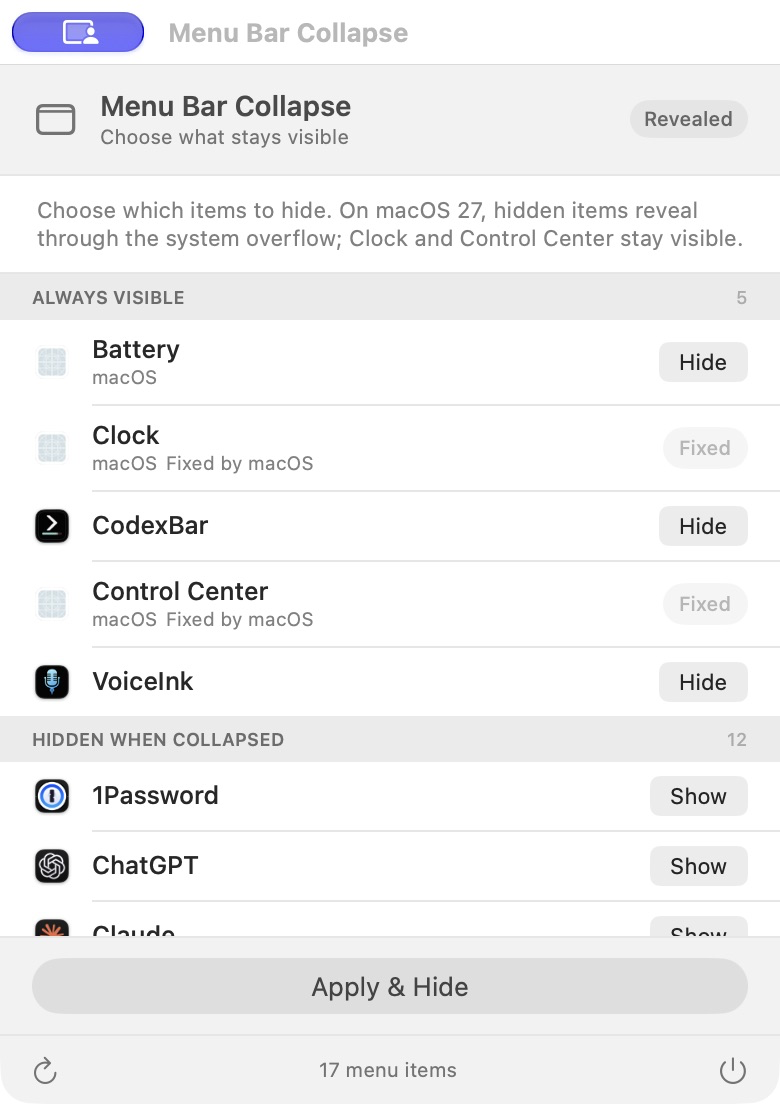
Choose your essentials.
Keep everyday items visible. Move less-used items into your hidden group.
Make a little room.
Apply your choices to reduce clutter, including around your MacBook’s camera notch.
Bring them back.
Use the menu bar control or press ⌃⌥M (Control–Option–M) when you need your hidden items.
Simple by design
Your choices
stay with you.
No account to create. No advertising or analytics in the app. Your item selections and settings are saved locally on your Mac.
Accessibility permission lets the app find, arrange, and activate menu bar controls. You stay in control of that permission in System Settings.
Read the app’s privacy policyA few things to know.
When can I download it?
Menu Bar Collapse is coming soon. Download details and supported macOS versions will be posted here when it’s available.
What stays under macOS control?
Clock and Control Center stay visible. Some menu bar items and the way hidden items appear are managed by macOS.
Need a hand?
Visit the support page for setup, permissions, and troubleshooting, or email us at hello@scailestudios.com.
Menu Bar Collapse support